Abstract
Fluorescence calcium imaging using a range of microscopy approaches, such as two-photon excitation or head-mounted "miniscopes," is one of the preferred methods to record neuronal activity and glial signals in various experimental settings, including acute brain slices, brain organoids, and behaving animals. Because changes in the fluorescence intensity of genetically encoded or chemical calcium indicators correlate with action potential firing in neurons, data analysis is based on inferring such spiking from changes in pixel intensity values across time within different regions of interest. However, the algorithms necessary to extract biologically relevant information from these fluorescent signals are complex and require significant expertise in programming to develop robust analysis pipelines. For decades, the only way to perform these analyses was for individual laboratories to write their custom code. These routines were typically not well annotated and lacked intuitive graphical user interfaces (GUIs), which made it difficult for scientists in other laboratories to adopt them. Although the panorama is changing with recent tools like CaImAn, Suite2P, and others, there is still a barrier for many laboratories to adopt these packages, especially for potential users without sophisticated programming skills. As two-photon microscopes are becoming increasingly affordable, the bottleneck is no longer the hardware, but the software used to analyze the calcium data optimally and consistently across different groups. We addressed this unmet need by incorporating recent software solutions, namely NoRMCorre and CaImAn, for motion correction, segmentation, signal extraction, and deconvolution of calcium imaging data into an open-source, easy to use, GUI-based, intuitive and automated data analysis software package, which we named EZcalcium.
🔬 Techniques
🧬 Organisms
✨ Fluorophores
🧪 Sample Preparation
💻 Software Details
💾 Data Repositories
🏛️ Research Organizations (ROR)
Affiliated research institutions:
📋 Methods
Equipment Programming experience is not required to run the toolbox. We recommend MATLAB R2018b (or newer MATLAB) on any operating system for using the EZcalcium toolbox. The toolbox was finalized and tested heavily in R2018b (9.5) and is likely to be the most compatible without modification in that environment. A 64-bit version of MATLAB running on a 64-bit computer is required to process files over 800 MB. The following MATLAB toolboxes are also required when running the source scripts: Image Processing, Parallel Computing, Signal Processing, and Statistics and Machine Learning. The amount of available system RAM necessary for a system depends on the size of the data being processed. Ideally, the amount of system RAM should be at least 3× the file size of raw, uncompressed data. Motion Correction and ROI Detection are the most RAM-intensive steps of the process, and significant slowdowns may occur if the necessary RAM is not available. CPU requirements for the toolbox are minimal, but processing is vastly improved with multiple cores. The toolbox also runs faster when the data to be analyzed are located on a fast, solid-state hard drive, since large amounts of data must be read and, in the case of Motion Correction , also written. Please note that EZcalcium is not designed to process data in real-time. EZcalcium can process data acquired with virtually any imaging software but users must first convert the imaging data to EZcalcium -compatible formats (.tif or .avi).
Software Setup
EZcalcium is freely available to be downloaded from the Portera-Cailliau Lab website 1 or its GitHub site 2 . We provide EZcalcium as a custom MATLAB toolbox, which users can download on the GitHub releases page 3 . To install EZcalcium manually instead, users will need to download the source code of EZcalcium as well as CaImAn 4 and NoRMCorre 5 . After everything is downloaded and added to the MATLAB path, type the command EZcalcium . A GUI will load that can run all the individual modules. When working in Windows, data saved to directories listed under C:Users, C:Program Files, and the directory in which MATLAB is installed are often protected against writing and deletion. Therefore, to process and generate data, it is recommended to use imaging files saved outside of C:Users, C:Program Files, and the directory in which MATLAB is installed. Failure to do so may result in an error stating “You do not have write permission.”
Show full methods section
Equipment Programming experience is not required to run the toolbox. We recommend MATLAB R2018b (or newer MATLAB) on any operating system for using the EZcalcium toolbox. The toolbox was finalized and tested heavily in R2018b (9.5) and is likely to be the most compatible without modification in that environment. A 64-bit version of MATLAB running on a 64-bit computer is required to process files over 800 MB. The following MATLAB toolboxes are also required when running the source scripts: Image Processing, Parallel Computing, Signal Processing, and Statistics and Machine Learning. The amount of available system RAM necessary for a system depends on the size of the data being processed. Ideally, the amount of system RAM should be at least 3× the file size of raw, uncompressed data. Motion Correction and ROI Detection are the most RAM-intensive steps of the process, and significant slowdowns may occur if the necessary RAM is not available. CPU requirements for the toolbox are minimal, but processing is vastly improved with multiple cores. The toolbox also runs faster when the data to be analyzed are located on a fast, solid-state hard drive, since large amounts of data must be read and, in the case of Motion Correction , also written. Please note that EZcalcium is not designed to process data in real-time. EZcalcium can process data acquired with virtually any imaging software but users must first convert the imaging data to EZcalcium -compatible formats (.tif or .avi).
Software Setup
EZcalcium is freely available to be downloaded from the Portera-Cailliau Lab website 1 or its GitHub site 2 . We provide EZcalcium as a custom MATLAB toolbox, which users can download on the GitHub releases page 3 . To install EZcalcium manually instead, users will need to download the source code of EZcalcium as well as CaImAn 4 and NoRMCorre 5 . After everything is downloaded and added to the MATLAB path, type the command EZcalcium . A GUI will load that can run all the individual modules. When working in Windows, data saved to directories listed under C:Users, C:Program Files, and the directory in which MATLAB is installed are often protected against writing and deletion. Therefore, to process and generate data, it is recommended to use imaging files saved outside of C:Users, C:Program Files, and the directory in which MATLAB is installed. Failure to do so may result in an error stating “You do not have write permission.”
Calcium Imaging
We provide examples of typical results from using EZcalcium to analyze two-photon calcium imaging data acquired in drosophila and mice. The mouse data were collected in the Portera-Cailliau lab.
Viral vectors expressing
GCaMP6s (rAAV-hSyn-GCaMP6s) were injected in the VPM nucleus of the thalamus or primary visual cortex of 2–2.5 month-old mice at the time of the cranial window surgery, as previously described (Goel et al., 2018 ). Cranial windows were implanted over the barrel cortex (thalamocortical axons in layer 4) or primary visual cortex (layer 2/3 neurons), as described (Holtmaat et al., 2009 ). After allowing 2–3 weeks for optical expression of the indicator, imaging sessions began using custom-built two-photon microscopes. Imaging was performed either with resonant/galvo mirrors at 30 Hz in awake head-fixed mice allowed to run on a floating polystyrene ball (visual cortex) or with galvo/galvo mirrors at 8 Hz in lightly sedated (chlorprothixene, 2 mg/kg i.p.) mice (axon boutons). These experiments followed US National Institutes of Health guidelines for animal research, under an animal use protocol (ARC #2007-035) approved by the Chancellor’s Animal Research Committee and Office for Animal Research Oversight at the University of California, Los Angeles, CA, USA. Drosophila two-photon calcium imaging data were obtained from R8 photoreceptors in the proximal medulla of the senseless-FLP fly line (UAS-opGCaMP6s/GMR-FRT-STOP-FRT-Gal4; UAS-opGCaMP6s/UAS-10X-myr::tdTomato), as described (Akin et al., 2019 ). Images were collected at 1 frame every 15 s using a custom-built two-photon microscope with galvo/galvo mirrors.
Supplementary Material The Supplementary Material for this article can be found online at: https://www.frontiersin.org/articles/10.3389/fncir.2020.00025/full#supplementary-material . Click here for additional data file.
📊 Figures
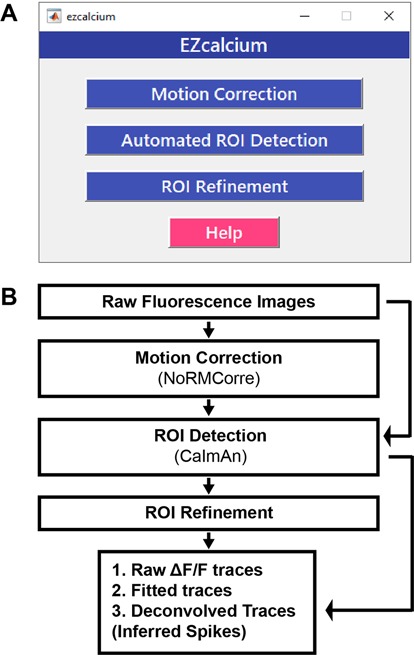
Figure 1
EZcalcium control graphical user interface (GUI) and workflow. (A) Appearance of the main EZcalcium control GUI. Each of the three modules of the toolbox is called by clicking on its respective button...
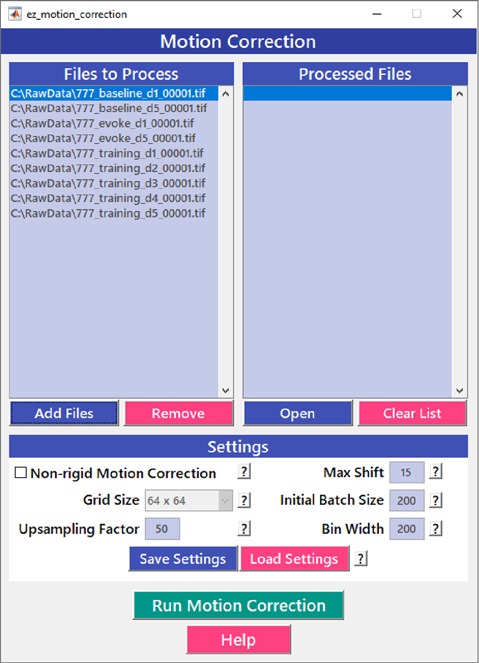
Figure 2
Motion correction GUI. The Motion Correction module utilizes the NoRMcorre algorithm to align the image sequences. It allows for batch processing of multiple videos.
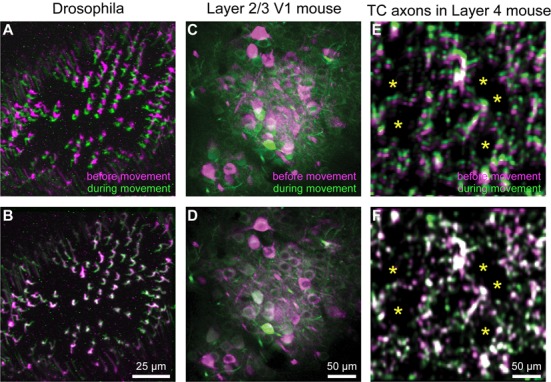
Figure 3
Motion correction results. (Au2013F) Representative xyt maximum intensity projections before (A,C,E) and after image registration (B,D,F) with EZcalcium for calcium imaging recordings of R8 photorecep...
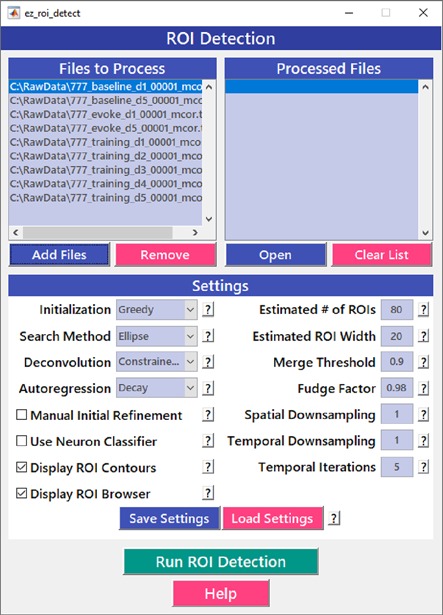
Figure 4
Region of interest (ROI) detection GUI. The automated Region of interest (ROI) Detection module is used to segment the image files into individual ROIs. It minimizes the impact of human bias in ROI se...
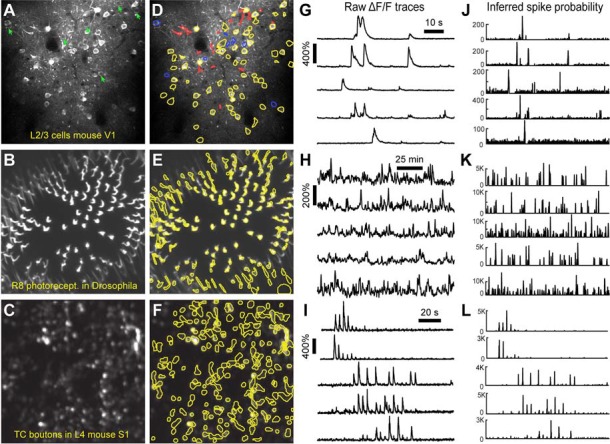
Figure 5
ROI detection results. (Au2013C) Representative examples of a field of view from two-photon calcium imaging of layer 2/3 neurons in the visual cortex of adult awake mice (A) , R8 photoreceptors in the...
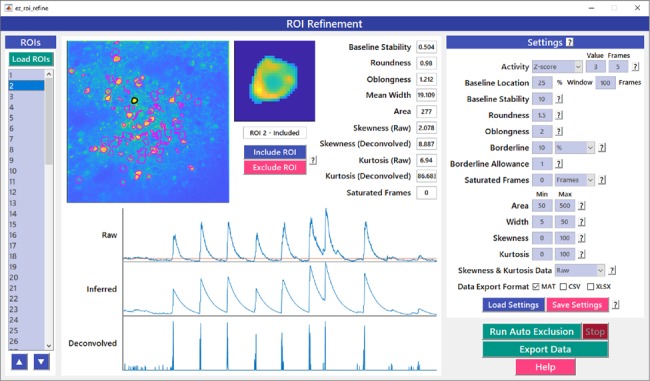
Figure 6
ROI refinement GUI. ROI Refinement is the final step of the EZcalcium workflow and consists of automatically or manually excluding ROIs based on their shape or their traces. Following refinement, data...
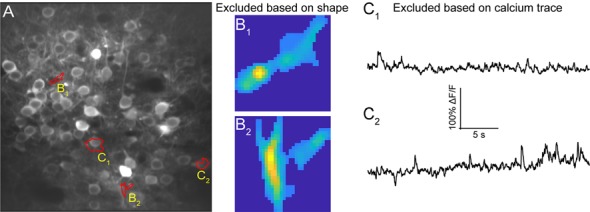
Figure 7
ROI refinement results. (A) Representative field of view from a calcium imaging experiment of layer 2/3 neurons in the visual cortex in an adult mouse (GCaMP6s) showing ROIs that showed unusual shapes...
Figure images are served from the NIH/NLM PubMed Central Open Access Subset or Europe PMC; copyright remains with the publishers and authors.
💬 Discussion
0 commentsNo comments yet. Be the first to start a discussion!
Leave a Comment